• Home
  • Strava Sites
  • Tutorials
    • Garmin
    • Strava
  • Contact
  • Resources

ScarletFire Cycling

Cycling, Garmin, Strava, tutorials, tips & tricks.


  • >>Start here<<
  • About
  • Instagram
  • Resources
  • Which Garmin is right for me?
  • Discount Codes
You are here: Home / Tutorials / How to embed Relive.cc videos in your blog posts (on WordPress sites)

How to embed Relive.cc videos in your blog posts (on WordPress sites)

Last Modified: August 30, 2016

Relive doesn’t provide an embed code for you to embed Relive videos in your own blog(yet?) But if you use WordPress, the solution may be easier than you think
In the comments of a recent post about how to embed a Strava ride into your blog, reader Mark asks how he can embed Relive video (from Relive.cc)

How to embed Relive video in a WordPress blog

If you use WordPress, and statistics would suggest that the vast majority of blogs do, then this is very easy, thanks to the fact that since a few versions ago, WP handles video embeds natively. This means you don’t need to use a third party plugin or anything additional. You just paste the URL of the video into your blog post and it will magically appear in your post!

So the key issue becomes >

How to get the video URL of your Relive video?

You can easily get this by viewing the source code of the Relive page.

In most browsers, just right click and choose “View Source” or “View page source” or similar option.

Remember to right-click on the white space around the video, not on the video itself.

relive right click

Next, you need to find the URL of the actual video file. The video file is an mp4 file so the easiest way to do this is to search the code for the string “.mp4”
This will highlight any bits of code that include .mp4

relive search mp4

Select the full address of the video file and copy it.
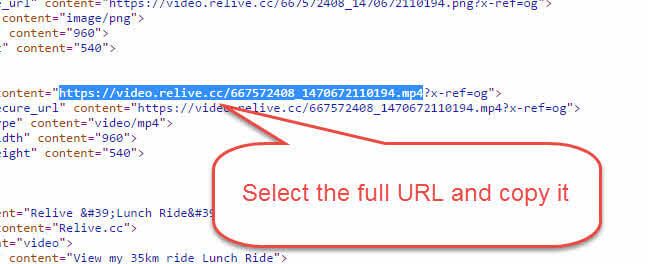
relive url

Lastly, just copy the video URL into your post editor in WordPress, and the video will display in your post.

Optional: if you want to specify a width, you can include the URL within an embed shortcode and include parameters for width and height, like this:

[embed width=”320″ height=”240″]https://video.relive.cc/667572408_1470672110194.mp4[/embed]

This will appear as follows:

https://video.relive.cc/667572408_1470672110194.mp4

I hope that helps you to embed Relive videos in your posts, if that’s what you were looking for.

Did it work for you? Share your links in the comments below.

Comments

  1. Mark says

    August 30, 2016 at 3:07 pm

    I will see if those tags work with blogger, as well.

    Thanks

    Reply
  2. Phil says

    September 3, 2016 at 10:16 am

    Many thanks. Works a treat.

    Reply
    • Al Thompson says

      September 3, 2016 at 2:28 pm

      Glad to help Phil. I see you’re just down the road from me! Tried to leave a comment on your blog but it wouldn’t let me.

  3. importtb says

    January 30, 2017 at 9:29 am

    Brilliant, thanks for this. I was making the mistake of clicking on the video!

    Reply
  4. dnmtb says

    March 13, 2017 at 11:14 pm

    Trying to embed on wix. Totally can’t get it to work :(

    Reply

Leave a Reply Cancel reply

Your email address will not be published. Required fields are marked *

This site uses Akismet to reduce spam. Learn how your comment data is processed.

Popular blog posts

Garmin edge 800 course navigation

Foolproof course navigation on the Garmin Edge 800.

MapmyRide export tool

How to export your ride data from MapMyRide to Strava

Transfer GPX file to Garmin

Readers questions: Transfer GPX file to Garmin?

Handy tips and tricks for new Garmin Edge bike GPS owners.

Tutorial: how to install free OSM maps on your Garmin edge 800

Deals

Do you use Strava?

Veloviewer will blow your mind!
Velowviewer logo
Visit now

Follow ScarletFire

Link up with me on your favourite social channels...

Need brilliant WordPress hosting?

ScarletFire is now hosted by GURU. I personally recommend them for their fantastic support and incredible customer service!

Forget Apache servers, GURU is based on Litespeed and your site will fly! Use promo code 2022 to get a trial period for just £1.

Guru hosting
£1 trial - use code 2022

Search

Copyright © 2026 · Disclaimer · Site created with Genesis Framework, by StudioPress.