As a fairly recent Strava convert, I was quite surprised to discover that it’s not possible to export GPX files of other people’s rides.
You can export your own routes, no problem, but not those created by others. Garmin Connect and ridewithgps.com both allow users to download gpx tracks, so why not Strava? Here’s a workaround…
It’s a very useful thing to be able to do. Imagine: you’ve missed the Sunday club run and the route looks awesome, covering some areas you’re not familiar with. It’s so easy to grab the gpx and use a Garmin to navigate the course on your own.
(Of course you could just print off a map… but paper is so last millennium)

Click for a mega list of Strava add-ons!
I poked around on the net and found lots of people dissatisfied with this lack of functionality in Strava, and then I poked around some more, and struck gold at
http://cosmocatalano.com/strava/export/index.html
Update: this tool appears to no longer work.
Try this one instead: http://strava-tools.raceshape.com/vpu/
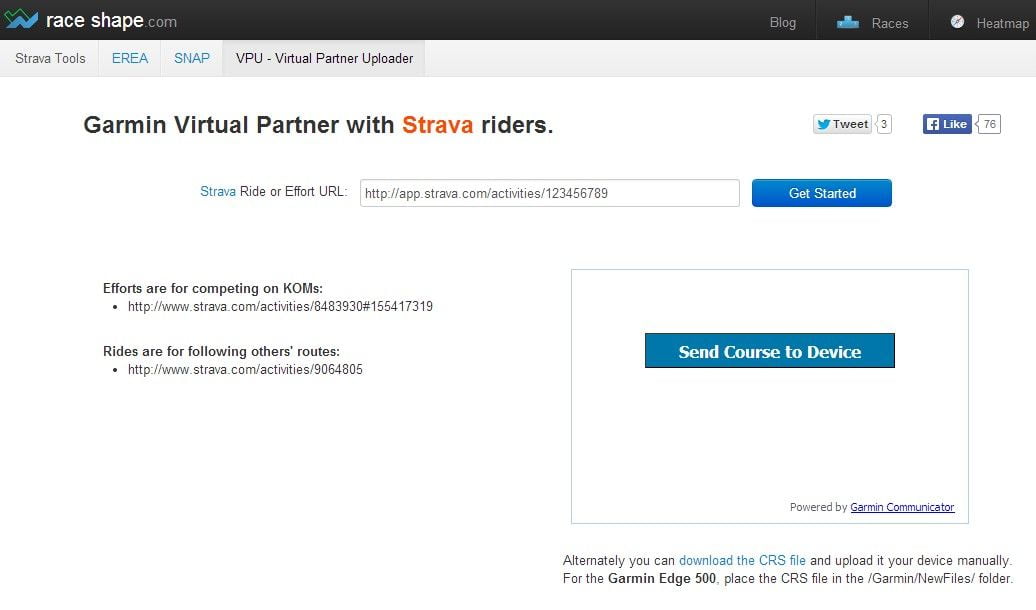
This site allows you to paste in the URL of a Strava ride, whereupon it magically creates a crs file of the route for you! (Just copy it over to your Garmin > New Files folder)
This kind of geekery amazes me, and it’s part of why I love the web. Not to be geeky just for the sake of geekdom, but because it’s a hotbed of creativity and generosity.
People helping people, in the pursuit of perfection.
Strava do allow Premium users to download GPX files in this way, so the best thing to do if you want to help Strava to develop their awesomeness would be to sign up for a premium account.

site doesn’t work anymore :(
thanks for letting me know. http://cosmocatalano.com/strava-to-tcx/ does work, thankfully. (does the same thing but outputs a TCX file)
awsome! this is what i need thanks for sharing
Glad it was useful. Please share on fb/twitter with your friends, if you think they might benefit too.
Thanks
Yes! This is also what I needed to “merge” a rogue Strava account (mistakenly created thru pilot error) with my real one.
Hope you good Android users are aware if you clean off your phone (like routine maint for instance) and bounce your Strava ride data – you’re going to also bounce the data off their server!!! This app makes it at least possible to preserve your ride data locally.
Where’s the tip jar here….
H
That could be very useful info – thanks! It would be horrible to lose all your ride data.
Thanks for taking the time to comment :-)
Yeah is hard to compete on a segment if you can’t download it and load into the gps.
Thanks for the Strava gpx export site. Bought a Dakota 20 about a month ago and up until recently was compatible with Garmin Connect. Not being able to download courses to take on Strava challenges was a pain (BaseMap not as easy to use). Now I’m full of enthusiasm to ‘Go get ’em’. Thanks again.
The bomb! Thank you so much.
Exporting a GPX is very useful. I’ve extended the idea to enable you to map your own end time onto a route that you’ve done but someone else tracked. It’s open to abuse on Strava, but there are so many other ways to cheat too I’m made this available anyway.
http://www.logicmonkey.co.uk/gpx
I would like very much to be able to download the resulting data from my rides. I am 77 years old with cardiac problems and I would like to be able to download the map, speed, heart rate, and power analysis in order to share it with my cardiologist. The info about how to do this (HTML tags ect) means nothing to me. Any help?
Bill
Hi Bill, have you considered viewing the performance data on the website with your cardiologist? If he/she has an internet connection, you should be able to log on to Strava, or Garmin Connect (or whichever site you use to log your rides) and view the data in situ, as it were. You would only need to take your username and password to the consultation, and log in. Hope that helps?
great :-)
Exporting the CRS file is great but how do I import it into Strava to create a route? I use CycleMeter and Strava on my iphone.
thanks
You can upload .tcx, .fit or .gpx files using the uploading tool:
http://www.strava.com/upload/select
So you really just need a converter from your format to one of those.
Hi guys! Just wanted to let you know about an useful file conversion tool to make gpx into kml and vice versa. It was helpful for me, so I though I should share it with others too. Thanks!
http://gpx2kml.com/ the tool to look out
on raceshape com you can export direct to gpx “)
direct link is:
raceshape.com/strava.export.php?ride=TYPERIDENUMBERHERE&type=GPX
e.g.
http://raceshape.com/strava.export.php?ride=200503591&type=GPX
thanks for that link,, that is awesome.. here’s to not wasting time trying to find the right trail again,, Cheers.
Hi, I just tried the gpx download link above (Strava has this utility available directly too) , but when I import it back into Garmin, I only get GPS data. The distance, speed, elevation are all missing. Any one else have a different experience?
It appears that Strava bought Race Shape back in 2014, and it looks like raceshape.com has been shutdown as it’s been inaccessible for days. Any other alternatives?
Looks like strava guys realize that raceshape was nothing else than a bad idea and they shut it down. Lets see if another tool apears soon to download from strava with out premium acount.
Just download in Safari or Chrome the extension ‘Strava, export gpx track’ and the problem is solved!
I’ve downloaded the chrome extension but it does not work.. it is black and white setting and the gps export button does not apper, do you know why? thanks
After you download it you can find an ‘export gpx’ button at the map on everyone´s strava ride
Hello
It worked perfectly
I get track from strava and import to wikiloc.com which can follow the track and tell me when I choose im wrong and need to return and go to correct direction
Thanks again !
In case you’re interested, https://mapstogpx.com/strava/ is an alternative tool to download GPX data from strava.com directly. It works in all browsers and works directly from your browser’s bookmark bar :)
This looks fantastic, Sverrir, thanks for letting us know about it :-)
It works !!!
it works as of today, thnx
Ok guys I have just finished a ride and save it on my garmin edge 1000.
After that, for some reason I created a course with that ride and now it does not display as an activity in the history folder.
Is there anyway possible to change that course back to an activity so I can upload it to strava?
I can still see all the data under courses but I don’t seem to be able to send it even manually.
Got some good segments on that ride and any help would be very much appreciated.
many thanks
Gus
may i ask a question which is about strava premium. is there any limited data to get when we buy premium strava using gpx export? for example, when we need data from other athelete is there has a limited gpx export when we already using premium strava.? please give a respond as soon as possible.
The alternative site doesn’t work anymore either!
have you found anywhere I can download all of the riders information for a segment? I am wanting to look in to cadence and speed for a particular segment and see who has that data and what the pattern is.
any help would be appreciated. At the moment I don’t think it can be done.
H10/1 is the segment name ;)
Interesting idea. I’d been tempted to ask Ben if Veloviewer can do that (at least for the people you’re connected to on Strava, if not everybody who has ever ridden the segment.)
Hey, you can try my strava_traces_downloader.py script, for download you track as GPX without premium.
https://github.com/dalacost/strava_hack_tools
anyway, it works at terminal, but may somebody can use it idea for a web service.
Many of the links you posted do not work anymore. I was really looking forward to getting a .crs converter for .gpx files but it looks like the link to race shape tool doesnt work anymore. Hoping someone can help me.
Have you tried https://www.alltrails.com/converter?
An alternative for Android users: https://play.google.com/store/apps/details?id=com.spark71.stravatogpx