Tim asks how he can embed a Strava ride on his blog. Here’s the answer!
Embed Strava into a blog
It’s remarkably simple, this one, but I think they’ve changed the layout a few times over the years so it’s not surprising that things become hard to find. Remember when MS Office brought in the “ribbon”? It still takes me ages to find certain things in Excel, when I’d know exactly how to do it in the old version. I digress.
If you have your own blog and you’d like to tell the world about your latest epic ride, you need to find the Strava embed code.
Strava embed code
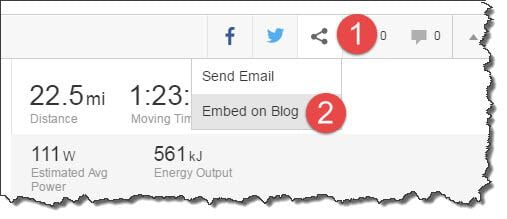
With your desired ride open in Strava, look for the little blobby “share” icon.
Click the Share icon, and then the “Embed on Blog” option.
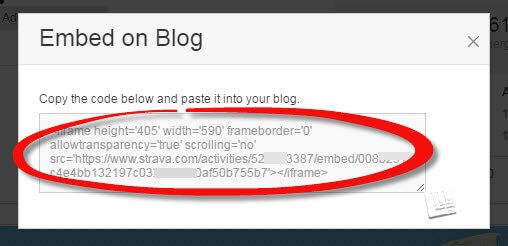
You’ll then get a pop up box with your strava embed code.
Select the code and copy (right click, copy, or just use the old keyboard shortcut classic, CTRL C)
Embedding the Strava code into your blog
If you’re using WordPress, there’s a right way and a wrong way to paste the Strava code into your blog.
When you’re editing posts in WordPress, you can either be in “Visual” mode or in “Text” mode.
You need to be in text mode.
Most people would probably edit in visual mode, as it’s more erm, visual. So you’ll need to switch.
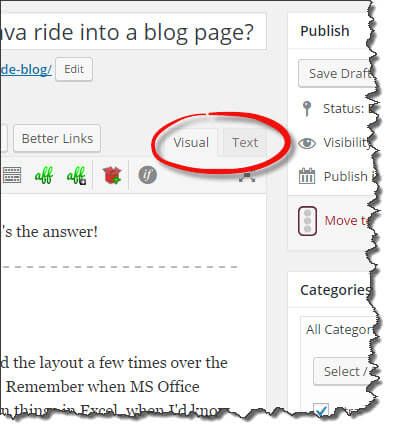
Once you’re in Text mode, go ahead and paste the code wherever you want the embed to appear in your post.
By default, the embedded Strava widget will probably appear aligned to the left, like this:
How to center your embedded Strava ride embed.
You can add a tiny bit of html to make the embed appear in the centre, like this:
<p style=”text-align: center;”> {Your Strava embed code} </p>
Please note that html uses the US preferred spelling of centre, which is center.
OK, here’s that same embed code, but wrapped in the code above.
Suddenly, it’s the same but magically middlemost, supremely centred, earth-shakingly equidistant.
Did you know? Alternative ways to embed your ride date into your blog.
You can also embed additional or alternative views of your ride into your blog, if you use Veloviewer.
In VV, I loaded up the same activity as the ride above, and was able to quickly produce this 3d image depicting the route and the climbs.

You can also do fancy embeds of routes (though not activities, it seems.)
Here’s an example of the Veloviewer embed code for Routes.
Here’s a route I created just for this post. It reminds me of an old Scalextric track!
You can click and drag the 3D route around to get a different perspective on the hills – try it!
Visit VeloViewer to see this with your own Strava data.Hope that helps some of you out!
Please leave any thoughts, comments, queries, or spare chocolate eggs in the comments below.

Wow, thanks a million Alan! I feel a bit silly I couldn’t find the share/embed button in strava now. Nevertheless, I’m glad I reached out as you have provided a much detailed reply than I could’ve hoped for. Some great tips and tricks in this blogpost. Thanks again for sharing!
One method I’ve found for sharing routes is BRouter (with the GPX export option).
Random example: http://brouter.de/brouter-web/#zoom=13&lat=50.5261&lon=10.3089&layer=OpenCycleMap%20%28Thunderf.%29&lonlats=10.287838,50.527942|10.402336,50.544854&nogos=&profile=trekking&alternativeidx=0&format=geojson
http://tinyurl.com/hqgabgd
Alan, is there a way of embedding your latest rides in a way that updates automatically (i.e. not one specific ride). I tried doing this into my wordpress blog a while ago but eventually concluded it wasn’t possible.
Thanks and keep up the good work, Stephen
Hi Stephen, I’ve not tried it, but this plugin may be worth a go? https://wordpress.org/plugins/wp-strava/
Any insight on how to embed Relive videos to a blog?
Hi Mark, I’ve written up a blog post on how to do this https://www.scarletfire.co.uk/embed-relive-videos/
looking to embed strava to squarespace site…need help!
Hi Ryan, I’ve never used Squarespace but I’m guessing this might help – https://support.squarespace.com/hc/en-us/articles/206543617-Using-the-Embed-Block