Losing ride data can be a harrowing experience. You worked so hard for it! Don’t despair, here are a few ways to recover your corrupt FIT file data.
There are a few options open to you:
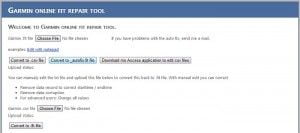
This could be your first port of call, as it’s a free online tool. Upload your file, let it work its magic, and download a fixed version.
This seems to be the big daddy. There’s a time limited trial version, following which you need to buy a licence to continue using it.
However, there are many kind people who hang out on the garmin message forum who, if asked nicely, will process damaged fit files and repost them to the forum.
Other tools of interest
http://monosujet.com/blog/2011/04/repairing-a-garmin-totals-fit-file/ – a little tool to correct the data when the “totals” goes awry due to a temporary spurious GPS signal.
TCX Convertor is a great tool for manipulating TCX files.
GPSBabel can convert FIT files to gpx.
The FIT SDK contains a tool (FitCSVTool.jar) to deconstruct a FIT file into CSV files, which can be edited manually, and then the tool can also reassemble the data into a FIT file once again. I’ve not tried this myself, but came across the info here.

Hello, another useful tool is the FIT File Tools site. It’s a set of useful tools for working with FIT files (such as merge, strip fields like power, change time) and can also do some basic repair.
http://www.fitfiletools.com
Thanks Kevin. I had corrupted time data and just used the change time tool. Keisewetter didn’t work. The paid one would have worked but the trial only gave half the file fixed. For just a once in a blue moon error I feel $50 USD for the paid version unjustified.
I had a corrupted data file when I was trying to upload my activity to Strava and I tried lots of things and programs but none of them solved the problem.
My solution was to open the file with Notepad and replace all the date in the file for the correct one,
After that I could upload my activity! .-D
Mine seems to have converted itself to a course.. Anyone know how to get 70 miles of data back to normal plz
Ian, did you ever figure out a solution? Our Garmin 520 has been saving our rides as courses for the past few days. We tried a reset and it worked for the test ride, and then it reverted to saving the rides as a course again.
Hi!My ride has become an invalid file after ending and saving it. Is there any way to save the file?Thanks in advance!
Another alternative: if you happen to be a Golden Cheetah user, import the fit file into Golden Cheetah, use the editor and then save the file back out as tcx. You can import the tcx file into Garmin again. In my case, there was one bad point at the end of my file which I deleted in the editor.