• Home
  • Strava Sites
  • Tutorials
    • Garmin
    • Strava
  • Contact
  • Resources

ScarletFire Cycling

Cycling, Garmin, Strava, tutorials, tips & tricks.


  • >>Start here<<
  • About
  • Instagram
  • Resources
  • Which Garmin is right for me?
  • Discount Codes
You are here: Home / Cycling / Garmin Edge 800 / How to transfer your Wattbike workout to Garmin Connect / Strava | The adventures of Randeroo

How to transfer your Wattbike workout to Garmin Connect / Strava | The adventures of Randeroo

Last Modified: April 9, 2017

Record your Wattbike session on to a USB stick
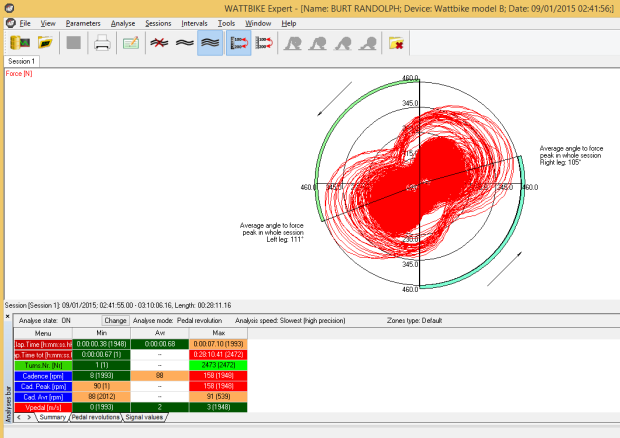
Install the Wattbike Expert Software and import the session from the USB stick
Select “Analyse” / “Export analysis modules” to export a DAT file
Go to wattbike2garmin to convert your DAT file to a TCX
Import the TCX into Garmin Connect / Strava etc…

This is a great guide for any Wattbike users who want to upload their workout data to Strava. I imagine that’s probably quite a large proportion of them!

Kudos to Randeroo for taking the time to post this tutorial.

I know how much time it takes to create quality guides and I’ve got a lot of respect for people who take the trouble to share their discoveries so that others can benefit.

I’ve never tried a Wattbike, but I hear they’re great. Anyone here used one?

randolphburt.co.uk

Leave a Reply Cancel reply

Your email address will not be published. Required fields are marked *

This site uses Akismet to reduce spam. Learn how your comment data is processed.

Do you need more Garmin help?

Garmin email 200 250 2

Follow ScarletFire

Link up with me on your favourite social channels...

Need brilliant WordPress hosting?

ScarletFire is now hosted by GURU. I personally recommend them for their fantastic support and incredible customer service!

Forget Apache servers, GURU is based on Litespeed and your site will fly! Use promo code 2022 to get a trial period for just £1.

Guru hosting
£1 trial - use code 2022

Search

Copyright © 2026 · Disclaimer · Site created with Genesis Framework, by StudioPress.